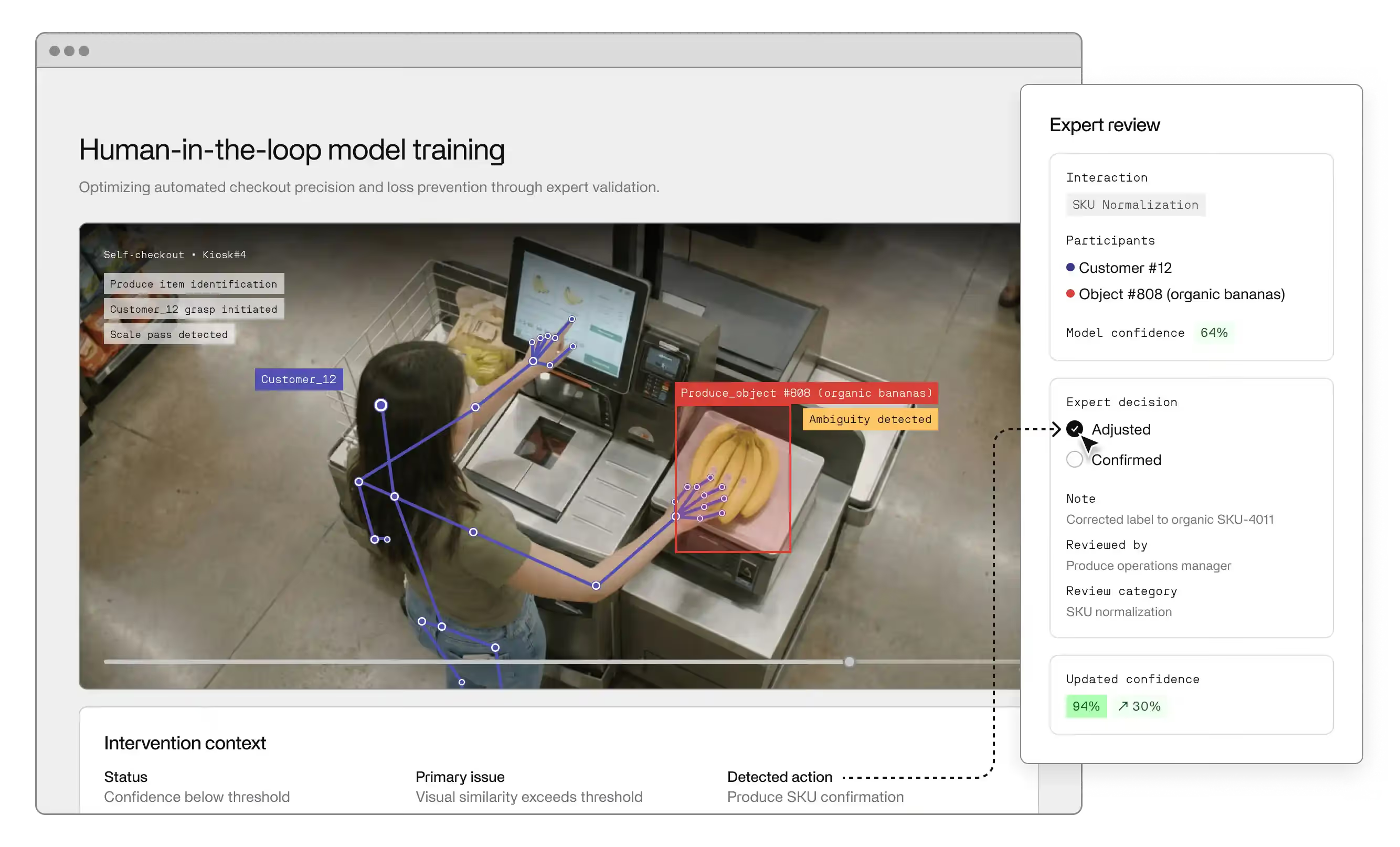
It’s tempting to think multimodal AI just means taking a text-based large language model, bolting on vision, and calling it a day—“ChatGPT, but with images,” “GPT-4o, but for screenshots,” “Copilot, but with slides.” In reality, that gives you a text-first AI system with a computer vision sidecar, not a true multimodal AI system. You’re still optimizing a transformer that was designed for text, now overloaded with pixels it doesn’t structurally understand.
Real multimodal AI is about how modalities work together in a workflow: computer vision for perception, natural language processing for reasoning over text, retrieval and tools for context, and orchestration logic to turn all of that into reliable behavior. The best generative AI products don’t rely on one giant model; they combine specialized AI tools and models (vision, text, retrieval) into coherent systems that solve specific problems end-to-end.
If you’ve grown up on text-only models, it’s easy to fall into the “text brain” reflex: add a vision encoder, fine-tune on some paired data, ship. That works (sometimes) for chatbots, but multimodal AI applications don’t just see “more tokens with pictures attached.”
Text models are trained on clean token sequences. Multimodal input streams are different: they’re lossy, asynchronous, and uneven. Video drops frames, audio is noisy, logs are incomplete. Treating all of that like a long prompt hides the real problems: synchronization, missing data, and different failure modes per modality.
That’s why a chatbot-style AI agent that feels great on text can fall apart when you hand it raw video + audio + logs. Without structure—who is speaking, what’s on screen, which events matter in time—the agent burns GPU on noise, misses critical signals, and delivers poor user experience under real-time and latency constraints. In multimodal settings, you’re not just building better prompts; you’re designing workflows that tell each model exactly what to look at, when, and why.
For multimodal systems, the right starting point isn’t “what model?” but “what task, for whom, at what cost of error?” That means grounding your design in concrete use cases:
Each setting has a different error budget and definition of “real-time.” In healthcare, 200 ms vs 800 ms doesn’t matter if the decision is correct; in e-commerce or customer support, an extra second can tank engagement. Getting multimodal right means designing workflows and systems around those constraints first—then choosing models, not the other way around.
In text land, you can often get away with “just add more tokens.” With multimodal datasets, that instinct gets expensive fast. Video, audio, and sensor streams are costly to collect and store; expert labels for medical images or industrial logs are even more expensive. What matters most is not raw hours scraped, but how well your data types line up and how precisely they’re annotated.
Two things dominate quality:
Recent work on fine-tuning large language models suggests that even modest fractions of incorrect or subtly misaligned data can seriously hurt performance and induce misbehavior. In a multimodal setting, where every labeled example is far more expensive, the tolerance for bad data is effectively lower. “More ai-generated data” or more clips doesn’t fix misaligned multimodal input; careful curation does. For ai-powered systems, you need fewer, higher-quality examples with clean structure—not a firehose of noisy recordings.
Designing multimodal datasets starts with deciding what’s in your world:
In practice, that looks like:
Once you have this structure, you can plug it into retrieval-augmented generation (RAG) pipelines: instead of asking a model to “remember everything,” you let an LLM retrieve the right text, image, or log chunk on demand. This is exactly how many production systems built on OpenAI, Microsoft, and Amazon stacks work today: a retrieval layer over your own multimodal data, a general model for reasoning, and an ecosystem of services around them.
Good multimodal dataset design is less about collecting exotic modalities and more about making sure your ai-generated outputs are grounded: the model can always find the right evidence, across the right data types, at the right moment.
A common trap in multimodal research is aiming for “one giant multimodal model” that does everything: see, read, reason, decide. In practice, most robust systems look more like decomposed AI workflows: perception → fusion → decision → action
Perception is handled by specialized multimodal models and AI models (computer vision for images/video, ASR for audio). Fusion combines signals across modalities. Decision-making uses rules, retrieval, or an LLM to reason. Action is where the system triggers downstream tools, updates, or alerts.
Take a real-time monitoring system in logistics or manufacturing:
An AI-powered workflow fuses these signals, reasons about risk, and triggers automation: pausing a line, notifying a supervisor, or opening a ticket. The value doesn’t come from one monolithic transformer; it comes from the way the pieces are wired together.
Once you know where to use LLMs, tools, and plain logic, you still have to make the whole AI system hang together. A simple way to think about the end-to-end workflow is:
inputs → preprocessing → encoders → fusion → policy → outputs
Writing this flow down forces you to decide where you can parallelize (e.g., video and logs in separate GPU streams) and where you have hard ordering constraints (you can’t apply a policy before you’ve encoded the inputs). For interactive ai tools like ChatGPT-style agents and copilots, that flow is what ultimately drives perceived latency.
Multimodal systems get expensive if you treat every request like a research experiment. To optimize for latency and GPU cost, you have a few main levers:
The right trade-offs depend on the use case:
Designing multimodal workflows this way turns “we glued some models together” into an AI-powered system that actually fits your real-time constraints and budget—rather than a transformer demo that melts your GPUs in production. How to evaluate multimodal AI beyond a single score.
In multimodal AI systems, you don’t learn much from a single headline evaluation score. What matters is how the model behaves across slices of the real world:
In healthcare, that might mean comparing performance across hospitals, scanners, or EHR systems. In customer support, you want separate metrics for voice calls vs chat transcripts vs email threads. In e-commerce, you’ll slice by product category, brand, or image quality. Slice-aware evaluation lets you see where your AI-driven system is brittle and where it’s safe to lean on automation, instead of assuming one average score represents the whole real-world deployment.
To get from flashy prototypes to reliable AI applications, you need evaluation as a loop, not a one-off test. In practice, that looks like:
The major ecosystems—OpenAI, Microsoft, Amazon—all support this pattern at the platform level: telemetry from live traffic, feedback signals, and hooks to feed new data back into training or RAG. Used well, they let researchers run iterative evaluation cycles that steadily optimize performance on the slices that matter most, turning demos into production systems without losing sight of how the model behaves in the wild.Real examples of multimodal AI agents and applications
Healthcare assistant
An AI-powered triage assistant acts as an AI agent over multimodal input: patient speech, EHR notes, and imaging. It summarizes symptoms, cross-checks history, flags risk factors, and suggests next steps to clinicians, turning disparate data into a single, usable view inside existing healthcare workflows.
Customer support copilot
A customer support copilot combines chat transcripts, backend logs, user-uploaded screenshots, and internal tools via APIs. The ai agent surfaces likely root causes, proposes replies, and triggers actions (refunds, resets, escalations), so human agents and chatbots work together instead of juggling multiple systems.
E-commerce recommender
In e-commerce, a multimodal recommender uses product text, catalog images, and user behavior signals to rank and explain products. The result is an AI-powered shopping experience where multimodal systems quietly personalize search, recommendations, and bundles underneath familiar ai systems and copilots.
If you already know how to ship text-only LLMs, you’re 80% of the way there. The shift to multimodal AI is less about exotic models and more about changing what you optimize for.
Here are five working principles to build on:
Evaluate by slices, not just one score.
Look at performance across devices, regions, noise conditions, and modalities. Use iterative, slice-aware evaluation loops to turn prototypes into production systems that actually behave in the real world.
A multimodal system typically has modality-specific encoders (vision, audio, text, sometimes sensors), one or more fusion mechanisms (cross-attention, concatenation, late fusion), and a policy/decoder layer that operates over a shared representation rather than over text tokens alone.
Common patterns are: (1) use encoders to map non-text inputs into embeddings that are injected into the LLM context, (2) let the LLM call out to specialized perception tools via function calling, or (3) route whole requests to separate multimodal models and have the LLM only handle dialogue and orchestration.
Treat entities, events, and alignment as first-class: consistent IDs, timestamps, and region annotations across modalities, plus slice-aware splits so you can evaluate robustness by device, domain, and noise conditions instead of a single aggregate score.
You index multimodal artifacts (images, clips, documents, logs) in a shared or modality-aware embedding space and retrieve them conditionally on the current query state, then feed both the retrieved context and the live inputs into your fusion/LLM layer.
You usually need task-specific objective metrics plus slice-wise breakouts: modality ablations, stress tests under degraded inputs, and per-segment performance (devices, domains, languages) to surface failure modes that a single “overall accuracy” hides.
You instrument the system to log inputs, intermediate representations, decisions, and user feedback; regularly mine failures and edge cases; add or relabel data for those slices; retrain or fine-tune; and re-deploy behind offline and online gates, repeating that loop as behavior and data drift.