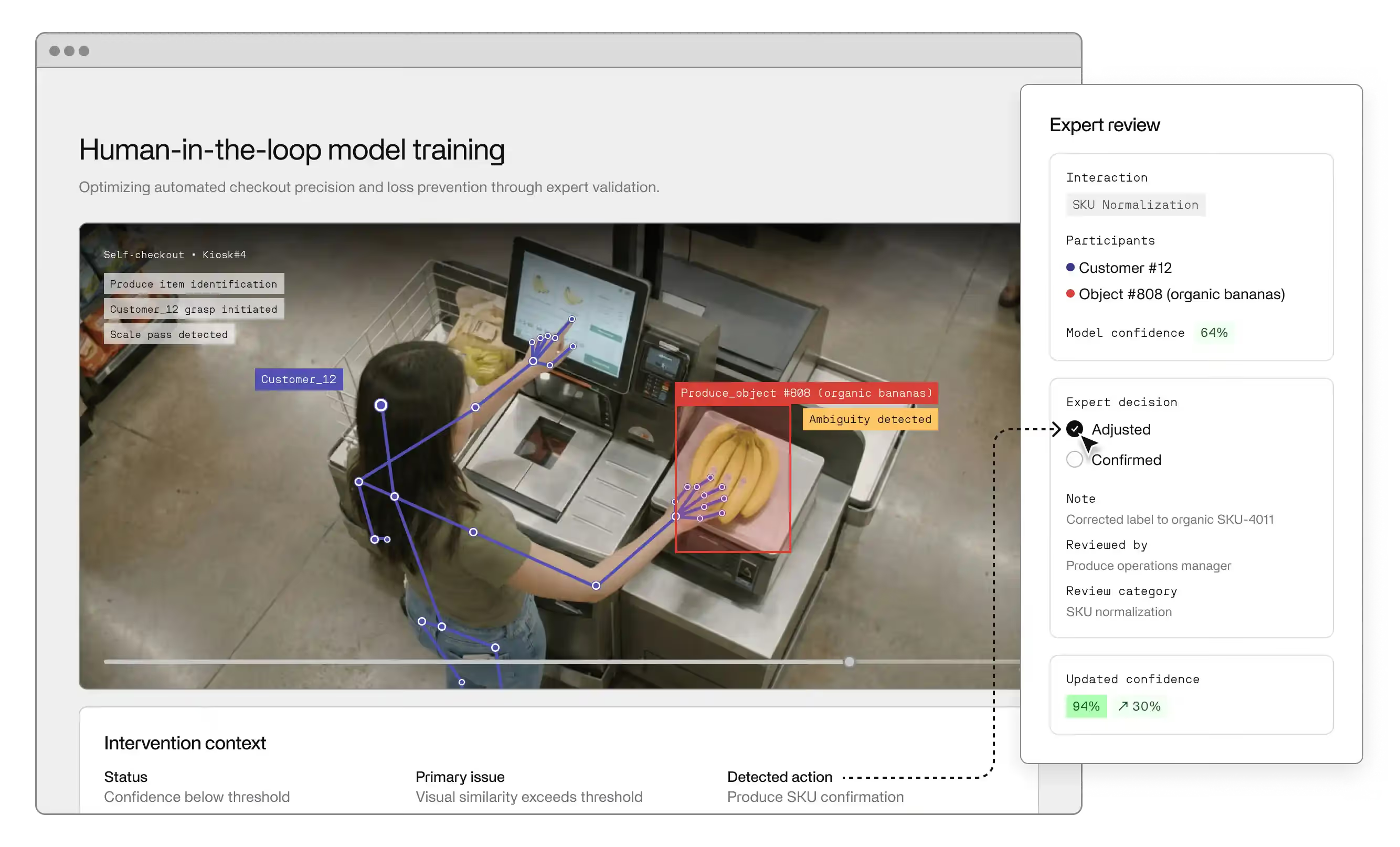
This guide is for operations, analytics, and innovation leaders who want to turn raw video into real-time, actionable insights, not just more dashboards and clips. Learn more about Invisible's computer vision solution here.
--
Enterprises generate massive volumes of video every day. Video is responsible for over half of all global data traffic. And for enterprises, much of this comes from cameras deployed across retail floors, manufacturing plants, logistics hubs, and healthcare facilities.
In many of these environments, artificial intelligence (AI) is already part of the video stack, with video surveillance the most significant use case. Yet, simply adding AI to video doesn’t automatically lead to better decisions. Most organizations get basic signal counts, detections, and alerts, but struggle to turn raw video into something they can analyze over time, compare across sites, or use to guide daily operations. Insights stay narrow. Context gets lost. And when conditions change, many systems fall back to manual review.
This is where AI video analytics and computer vision (CV) start to matter at an enterprise level. They are not just tools for watching footage. They are systems that convert video streams into structured data that teams can measure and act on.
This guide explains how AI video analytics works in real enterprise environments.
Visual intelligence is the broader discipline focused on how machines interpret visual inputs. It covers how software understands images and video, including what appears in a scene, how things move, and how activity unfolds over time.
AI video analytics is the applied layer. It takes video footage and video streams and turns them into structured video data, metadata, and actionable intelligence.
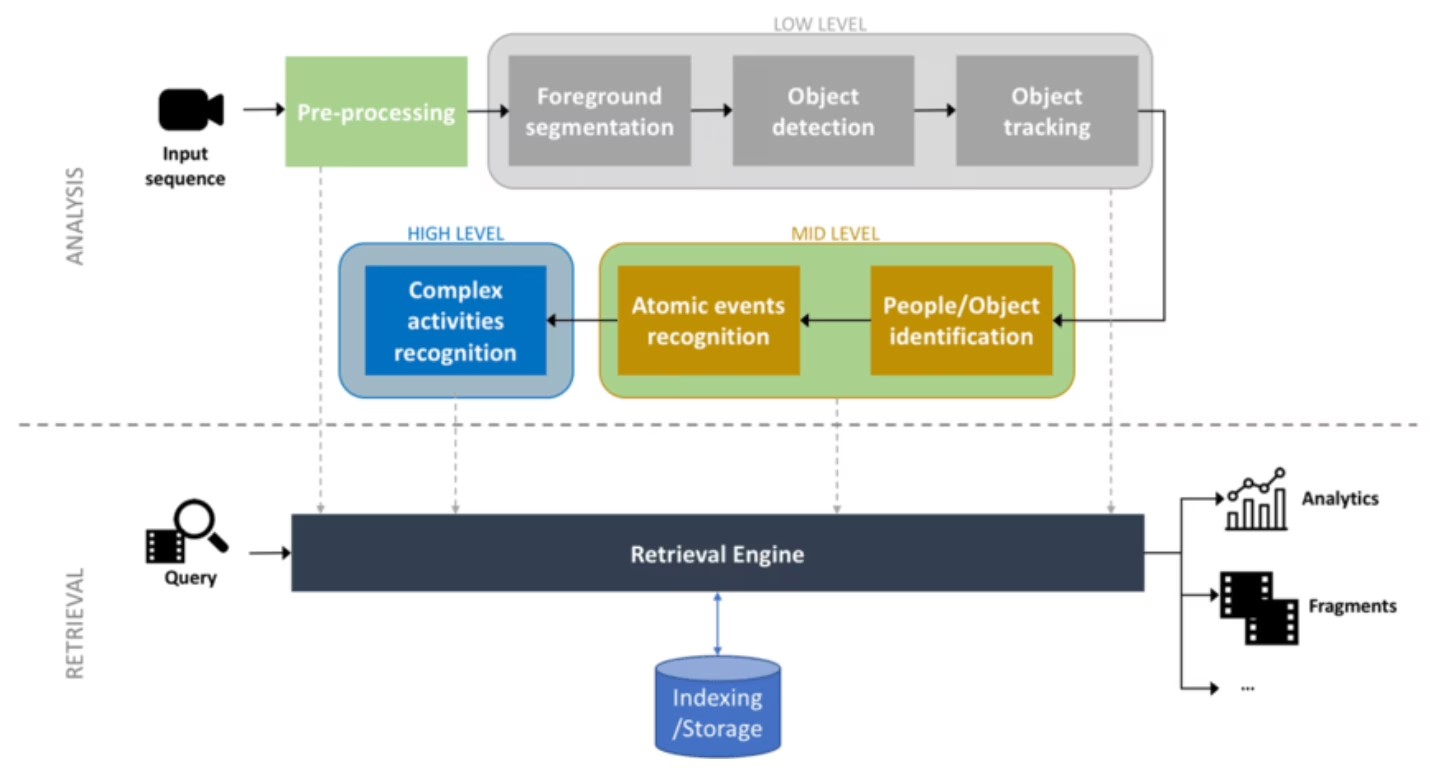
At a technical level, this process is incremental:
The difference between basic object detection and full AI-powered video analysis is scope. Object detection answers narrow questions, such as whether a person or object appears in frame. Enterprise video analysis examines patterns and sequences to inform decisions.
For instance, basic detection can count how many people enter a store. Enterprise video analysis reveals where shoppers hesitate, where queues form repeatedly, and how movement changes by time of day.
This is also why enterprise teams move beyond ad hoc tools. Real environments change, cameras shift, lighting degrades, and use cases evolve. A scalable production-grade AI video stack is built for that reality. It supports continuous ingestion, model updates, performance monitoring, and integration with downstream analytics and operational systems.
AI video analytics addresses a few persistent problems, including:
Organizations collect hours of video from CCTV, body cams, production floors, and facilities every day. Most of it sits in storage. AI video analytics converts that raw video into structured datasets, summaries, and metadata.
Manual video review is slow, subjective, and expensive. AI systems apply the same logic across every camera and time window. This creates consistent metrics for counts, dwell time, movement, and events, making results easier to validate and compare over time.
Many legacy systems fail in low light, crowded scenes, or non-standard environments like shop floors, fields, or sports footage. Modern AI video analytics is trained on varied, messy data and focuses on behavior over time.
Many off-the-shelf video analytics tools require footage to be sent to external cloud services. In regulated or sensitive environments, this creates immediate security and compliance issues. Enterprise AI video analytics platforms address this by supporting on-premise, edge, or hybrid deployments, so video can be analyzed without leaving the organization’s control.
Cameras alone don’t improve operations. AI video analytics bridges that gap by turning visual activity into signals that feed dashboards, alerts, and downstream systems. Teams move from watching footage to acting on quantified patterns in near real time.
Video content becomes useful when it answers the everyday questions that teams already argue about. Where are we slowing down? Why do queues spike at certain times? Are safety rules actually followed on the ground?
AI-driven analytics pulls those answers directly from what’s happening on camera. Instead of reviewing footage, teams work with simple outputs tied to real activity.
In a warehouse, this might mean seeing exactly where pallets back up during peak hours and how long they sit before moving again. On a factory floor, it can reveal which stations cause repeat delays or where people regularly step into unsafe zones.
These real-time insight loops reduce lag between events and response, and teams don’t have to wait for weekly reviews or post-incident reports. They can adjust layouts, staffing, or workflows as conditions unfold. Over time, decision-making relies less on memory or gut feel and more on what actually happens day to day.
AI video analytics shows up differently depending on the environment. Below is a list of AI video analytics use cases across different industries.
AI video analytics helps retailers see what actually happens on the floor, including where people spend time, which aisles get crowded, and when shelves run low on stock. It can also track and compare online engagement across social media campaigns and reels with in-store activity by analyzing foot traffic and dwell time near promoted products. This helps retailers see which campaigns actually drive visits and purchases.
Grocery chains like Town Talk Foods used AI video analytics to understand shopper behavior and in-store flow.
Sports organizations have always relied on video. The change is that analysis no longer depends on people tagging clips by hand. AI systems can now track players, space, and movement automatically across full games and seasons. That turns film into structured inputs for performance review, AI training design, and scouting.
A leading NBA team partnered with Invisible to analyze game film and extract player movement and performance data, supporting their 2025 draft strategy.
Large-scale agriculture produces video from drones, fixed cameras, and equipment-mounted systems. Reviewing it manually doesn’t scale, especially across wide fields and long seasons. Visual intelligence systems analyze imagery to surface patterns in crop health, equipment usage, and field activity, giving operators earlier signals about where attention is needed.
Deep learning and computer vision are being applied to real agricultural imagery to track growth, identify disease, and assess plant condition. This helps turn visual data into real operational insights.
Factories and warehouses don’t struggle with visibility. They struggle with flow. Cameras capture movement, but humans can’t track patterns across shifts or weeks. AI video analytics helps teams see patterns that don’t show up in dashboards: where material waits, how long loading actually takes, and which handoffs create repeat slowdowns.
Amazon applies computer vision in fulfillment centers to track item movement and identify congestion, supporting more efficient picking and routing decisions.
In regulated, safety-critical environments like healthcare, video analytics focuses on patterns rather than surveillance. Systems flag repeated entry into restricted zones, missing protective equipment, or risky interactions with machinery. AI analysis can run on-premise, producing alerts and metrics without exporting sensitive footage.
Industrial operators using Siemens video analytics monitor PPE compliance and hazardous zones to reduce incidents and support audits.
At the lowest level, teams track whether the system is technically doing its job. That usually means checking things like detection accuracy, how reliably objects are tracked over time, and whether insights arrive fast enough to be useful, not minutes later.
Once that foundation is in place, attention shifts to operational impact. Organizations typically measure metrics such as:
Which metrics count as “good enough” varies by use case. In retail or sports, trends and patterns over time may be more important than frame-perfect accuracy. In safety, healthcare, or compliance-heavy environments, teams set tighter thresholds because missed events carry real risk.
When these signals are reliable, the business value becomes measurable. Faster flow, fewer incidents, better use of resources, and less manual review all show up directly in operational metrics.
Enterprise video analytics works as a pipeline. Each stage turns raw video into clearer and more useful signals.
The pipeline starts by pulling video content from many sources. This includes live camera feeds, VMS platforms, mobile devices, drones, and archived footage. Formats often vary by site and vendor. A production-grade system handles this without manual work.
At ingestion, the system syncs streams and adds context. It tags camera IDs, locations, and timestamps early. This makes it possible to compare events across sites. In many deployments, ingestion runs close to the cameras.
Video is processed frame-by-frame on GPUs after ingestion. Deep learning models detect people, vehicles, equipment, or other objects. Tracking algorithms then follow them across frames. This shows how things move, stop, and interact over time.
Behavior analysis sits on top of detection and tracking. It looks for patterns. This includes queue build-up, unsafe entry into zones, stalled assets, or repeated delays at the same location.
Some pipelines also process audio. Research shows that multimodal summarization techniques can combine visual and audio cues to generate condensed transcriptions of key events in a video. This helps teams review activity without watching full clips.
This is where video becomes rich metadata. Raw detections are converted into structured datasets. Each record includes a clear context. Who was involved, where it happened, when it occurred, and what type of activity it was. Data is stored as a time series, allowing trends to be tracked across hours, days, or sites. This structure makes video data usable by analytics teams, not just operators.
Simple tools deliver the insights. Dashboards show live metrics, alerts, and trends. Teams can see what is happening now and how it compares to the past. API endpoints push real-time insights into existing systems. This includes supply chain tools, safety platforms, BI dashboards, and automation workflows. These integrations close the loop from observation to action, in near real time.
Enterprise video analytics systems fail or scale based on design choices. Accuracy alone is not enough. The platform must adapt to change, integrate cleanly, and run reliably in real environments.
The table below outlines the key features and architecture factors that determine whether an AI video analytics platform can scale and perform at an enterprise level.
Invisible approaches visual analytics as an end-to-end computer vision system, not a single model or dashboard. The aim is to turn raw footage into structured signals teams can use in real operations.
The system ingests video from many sources, including CCTV, body cams, broadcast feeds, mobile video, social media clips, and reels. It normalizes video data and metadata so frames, timestamps, and camera context stay consistent across locations and formats. From there, computer vision models handle detection, tracking, and activity analysis. Movement is followed over time, not just spotted in isolated frames.
Invisible converts those outputs into structured data. AI-driven tagging and summaries in natural language make the results easier to review and share. Actionable insights then flow into dashboards, analytics tools, or APIs, depending on how teams work.
Most video analytics tools stop at detection. Invisible offers a different outcome: decisions, not footage.
Traditional systems focus on fixed questions like “Is there a person here?” Invisible train models that look at how things behave over time. Movement, flow, dwell, and interaction become measurable signals that teams can use to improve operations.
Legacy tools often break down when lighting changes, crowds form, or cameras shift. Invisible builds CV models for noisy, dynamic settings like factories, stores, fields, and stadiums, where conditions change daily.
Many AI tools require sending video to external clouds. Invisible supports secure, local, or hybrid deployments, so sensitive footage stays under your control while still delivering real-time insights.
Instead of producing more clips and alerts, Invisible delivers structured data that feeds dashboards, planning tools, and BI systems.
If your organization still struggles to turn video into consistent, decision-ready insight, Invisible can help. Book a demo to see how our trained CV models can deliver consistent, decision-ready analytics.
AI video analytics turns video into structured data like counts, movement, and events. Standard surveillance records footage for later viewing. AI systems analyze activity in real time and produce data that teams can measure and act on.
It reduces manual monitoring and review. It converts unused video into operational data. Teams gain clear insight into flow, delays, safety risks, and behavior patterns across sites.
It shows where lines slow down, assets wait, or work becomes unsafe. Teams can track throughput, bottlenecks, and loading times using real activity data rather than estimates.
It can help to measure in-store flow, queue length, and dwell time. Retail teams use this data to improve layouts and staffing. The data can also help to understand the conversion between online and in-store behavior.
Computer vision tracks players, movement, and space usage from game footage. Video becomes performance data that supports coaching and draft decisions.
Enterprises must control where they process or store the video. Many platforms support on-prem or edge analysis. Hence, the footage never leaves the company. Access control, anonymization, and audit logs are also essential to maintain compliance and security.