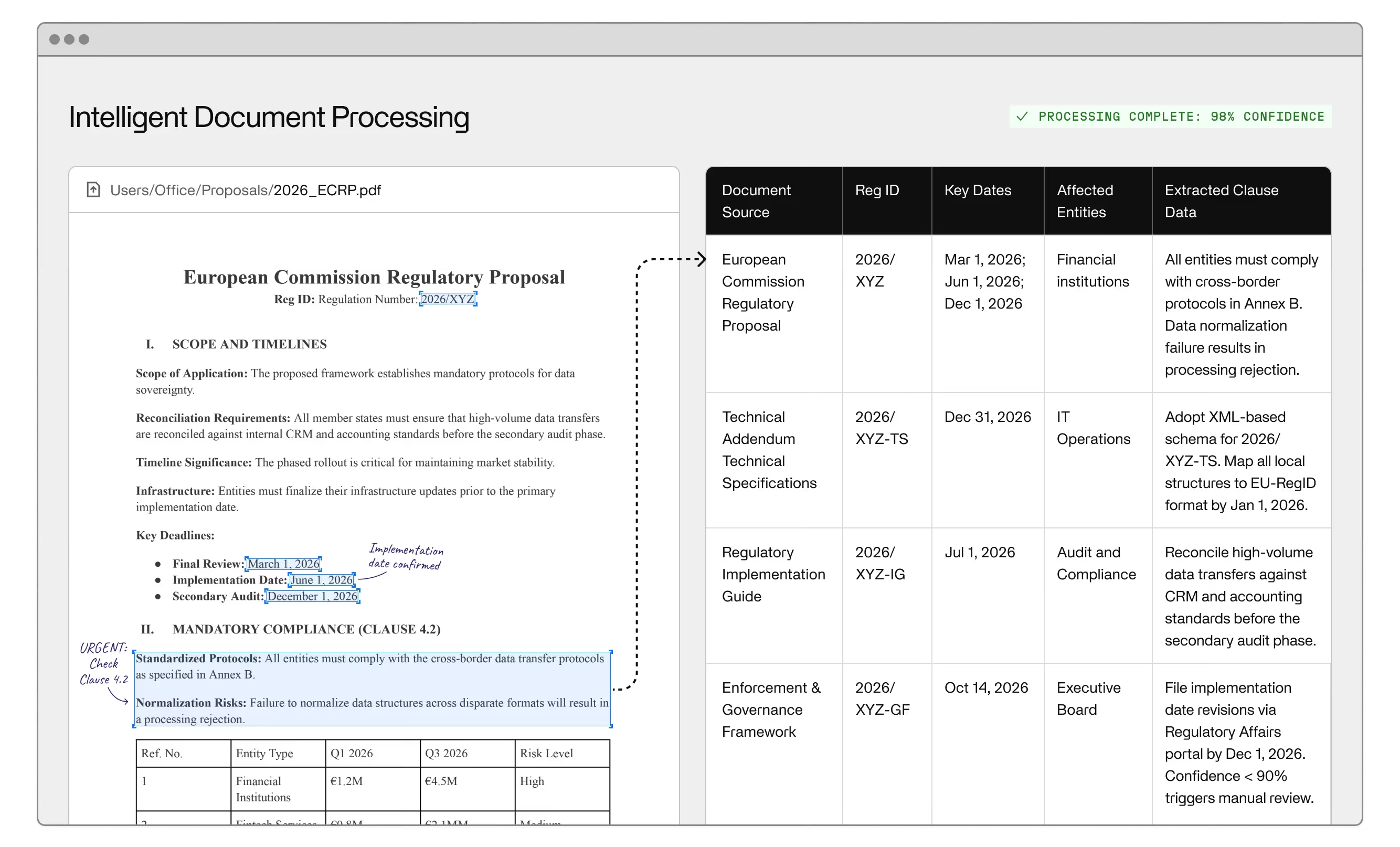
Back-office automation is the use of software — increasingly artificial intelligence — to handle operational work that keeps an enterprise running but never reaches the customer: document processing, data entry, approvals, compliance checks, financial reconciliation, and the dozens of other back office tasks that consume headcount without building competitive advantage. The execution is where most enterprises get it wrong, usually because they underestimate what back-office work actually demands from an automation system. This guide explains what back-office automation is, where it creates measurable value, and what separates the tools that hold up in production from the ones that break on the first exception. If you're evaluating whether your operation is ready to move, Invisible's back-office automation platform is built specifically for the exception-heavy workflows that rule-based tools can't handle.
Back office automation starts with a clear definition of what the back office actually is. Back-office functions are the operations that support the business without directly interacting with customers — finance and accounts payable, human resources and employee onboarding, procurement and order processing, compliance and regulatory filing, supply chain coordination, and document-heavy workflows that cut across all of them. The distinction from front office work isn't just structural. Back-office processes tend to be high-volume, time-consuming, and dependent on data moving accurately between systems. A single error in an invoice, a missed step in an onboarding workflow, or a compliance filing outside the required format doesn't surface immediately — it surfaces weeks later, after it has created downstream problems that are expensive to trace and fix.
That's what makes back-office operations a natural target for business process automation. The work is repetitive tasks at volume — well-defined enough to systematize, consequential enough that errors carry real cost. The challenge is that "well-defined" is doing a lot of work in that sentence. In practice, back-office processes are riddled with exceptions — documents that don't match the expected format, approval chains that vary by jurisdiction, data that arrives incomplete or inconsistent. The automation approach that works for a perfectly structured process will fail the moment the real world shows up.
Back-office automation uses software to execute the steps in a workflow that would otherwise require human input: extracting data from documents, validating it against defined rules, routing it to the right system or person, triggering notifications and downstream actions, and logging the outcome. Rule-based systems follow a fixed decision tree. Intelligent automation — AI-powered systems that interpret variable inputs — handles the same steps with the flexibility to manage variability and escalate genuine exceptions to human reviewers at the specific points where judgment is needed, rather than at every step where the input doesn't perfectly match expectations.
The operational difference matters. In a manual back office process, a team member receives a document, reads it, extracts the relevant data, checks it against the appropriate records, and enters it into the relevant system. Automating workflows means each of those steps executes without human intervention — provided the document is clean and the data is complete. When it isn't, the system either fails silently, produces bad data, or flags the exception for review. Which outcome you get depends almost entirely on how the system was built to handle cases it wasn't expecting.
Robotic process automation was the dominant back-office automation technology for most of the 2010s. RPA works by mimicking the actions a human takes in a software interface: clicking, copying, pasting, entering data. For business processes that are fully structured and never vary, it works. For everything else, it becomes a maintenance problem. A small change to the layout of a form, a field that occasionally arrives empty, a document type that appears infrequently — any of these can break an RPA bot and require manual intervention to fix.
The brittleness of rule-based automation reflects what it was built for: predictable, structured routine tasks. Most enterprise back-office work is neither. Invoices arrive in dozens of formats. Regulatory requirements change. Legacy systems produce inconsistent outputs. The inefficiencies that result aren't random — they're structural, and they compound. The back-office exception problem is what rule-based tools cannot solve by design.
Modern back office automation software handles this differently. Instead of following a fixed decision tree, it interprets inputs, identifies what a document contains regardless of format, applies learned patterns to validate and route data, and escalates genuine exceptions to human reviewers with the relevant context already extracted. The human stays in the loop, but only where judgment is actually necessary — not at every anomaly a brittle bot can't process. The result is an end-to-end workflow that handles real-world variation without constant maintenance, and that continues to streamline operations as data volumes grow.
The highest-value entry points for back-office automation share two characteristics: the workflow is high-volume enough that manual processing is a genuine operational drag, and the cost of errors is visible on the balance sheet. Accounts payable is the most common starting point. Invoice processing is labor-intensive, error-prone when done manually, and directly tied to cash flow and vendor relationships. Automating extraction, validation, matching against purchase orders, and approval routing eliminates a category of manual tasks that no team should still be carrying at enterprise scale.
Employee onboarding is another high-impact use case. The workload is document-heavy, touches multiple systems, and carries compliance obligations that make errors costly. Automating the document collection, data management steps, and system provisioning reduces onboarding time and improves the employee experience from day one — and the downstream effect on customer experience is real. Teams that are operational faster deliver consistent service quality faster.
Order processing and procurement follow similar logic. The workflows are repetitive, the data requirements are well-defined, and the downstream consequences of delays or errors — unfulfilled orders, missed SLAs, supply chain disruptions — are quantifiable. Financial reporting and compliance filing are further along the complexity curve, but the same principle applies: high-volume, rule-governed, consequential, and expensive to handle manually at scale. These are the back-office functions where process automation consistently delivers cost savings with a clear return — and where how AI is turning back-office operations into a strategic driver for financial services is already playing out in production.
The operational outcomes of well-implemented back-office automation are consistent across industries and workflow types. Processing speed increases because software doesn't have a queue. Human error decreases because validation rules apply uniformly, without the variability that comes from fatigue, competing priorities, or inconsistent training. Data quality improves because structured extraction and validation catch problems at the point of entry rather than downstream when they're harder to fix. Together, these gains streamline the back-office functions that would otherwise bottleneck the business and reduce customer satisfaction through slow fulfillment, billing errors, and delayed onboarding.
The less obvious outcome is scalability. A manual back-office operation scales linearly with headcount. An automated one scales with volume — absorbing spikes from a regulatory change, acquisition, product launch, or seasonal peak without proportional headcount increases. Operational efficiency stops being a target and becomes a structural characteristic of how the back office runs. For leaders focused on business growth, that's the difference between a cost center and a competitive capability.
Real-time visibility is a related benefit that often goes underweighted in the initial business case. When back-office workflows run through automated systems, every step is logged — giving compliance teams an audit trail and giving operations leaders the data to optimize processes over time. That same layer supports more reliable forecasting, surfaces bottlenecks before they compound, and helps flag anomalies that manual processes would miss entirely. The bottom line impact of that visibility is harder to quantify than processing speed, but it's often what separates an operation that scales cleanly from one that doesn't.
The clearest signal that your back-office operations are a viable automation target is that your team spends significant time on work that follows a pattern but requires enough variation to defeat simple rules. If your accounts payable team manually touches every invoice because the formats vary too much for a basic OCR solution, that's the signal. If your compliance team re-enters data between systems because the integration doesn't exist or doesn't work reliably, that's the signal. If onboarding a new employee takes two weeks not because the work is complex but because it requires chasing documents across departments and entering the same data into four systems, that's the signal. Digital transformation doesn't begin with a strategy deck — it begins with identifying the workflow automation opportunities that are already costing you money.
The harder question isn't whether automation would help — for most enterprise back-office operations, it clearly would — but whether the systems and data infrastructure can support it. Siloed data and undocumented processes don't just slow implementation — they actively undermine the decision-making an automation solution depends on to route, validate, and escalate correctly. It's also why most enterprise AI projects fail at the transition from pilot to production. Digitizing document-heavy workflows is a reasonable first step, but selecting automation tools before that foundation is in place produces the same result RPA projects have delivered for a decade: a working pilot, and a brittle production system that requires more maintenance than the manual process it replaced. If you're working through what it actually takes to make your organization AI-ready, that question is worth answering before you select a platform. Optimize your processes before you automate them, not after.
If your back-office operations are ready for automation that handles exceptions as competently as it handles routine workflows, explore Invisible's back-office automation platform or get in touch with our team.
RPA automates structured, rule-based tasks by mimicking human actions in software interfaces. It works well when inputs are perfectly consistent but breaks on exceptions. AI-powered back-office automation interprets variable inputs, handles unstructured documents, and routes genuine exceptions to human reviewers — making it suitable for the messy, high-variation workflows that constitute most enterprise back-office work.
The strongest candidates are high-volume, repetitive workflows where errors carry measurable cost: accounts payable and invoice processing, employee onboarding, order processing, procurement documentation, and compliance filing. These processes share a common structure — document-heavy, data-intensive, rule-governed — while containing enough variation that manual processing doesn't scale cleanly and rule-based tools require constant maintenance.
For well-scoped, high-volume workflows like invoice processing or employee onboarding, measurable results — faster processing times, reduced error rates, lower manual intervention — typically appear within the first few months of deployment. The timeline lengthens when the underlying data is fragmented or processes are undocumented, which is why the preparation phase matters as much as the technology itself.
No — it changes where human judgment is applied. Well-designed back-office automation handles routine processing autonomously and escalates genuine exceptions to human reviewers with the relevant context already extracted. Staff time moves away from data entry and manual routing toward exception handling, quality review, and higher-judgment tasks. The goal is fewer humans doing low-value repetitive work, not fewer humans in the operation.
Effective exception handling requires the system to recognize when an input falls outside expected parameters, extract whatever context is available, and route the exception to a human reviewer with enough information to resolve it quickly. Rule-based systems can't do this — they either fail silently or halt the workflow. AI-powered systems learn what normal looks like and escalate the rest, which is what makes them suitable for production environments rather than controlled pilots.
Back-office automation typically sits as a layer above existing ERP, CRM, and legacy systems rather than replacing them. It ingests data from those systems, processes and validates it, and writes outputs back — reducing the manual steps that currently bridge system gaps. Integration complexity varies by environment, but the goal is to eliminate the manual data entry and re-entry that happens when systems don't communicate reliably with each other.