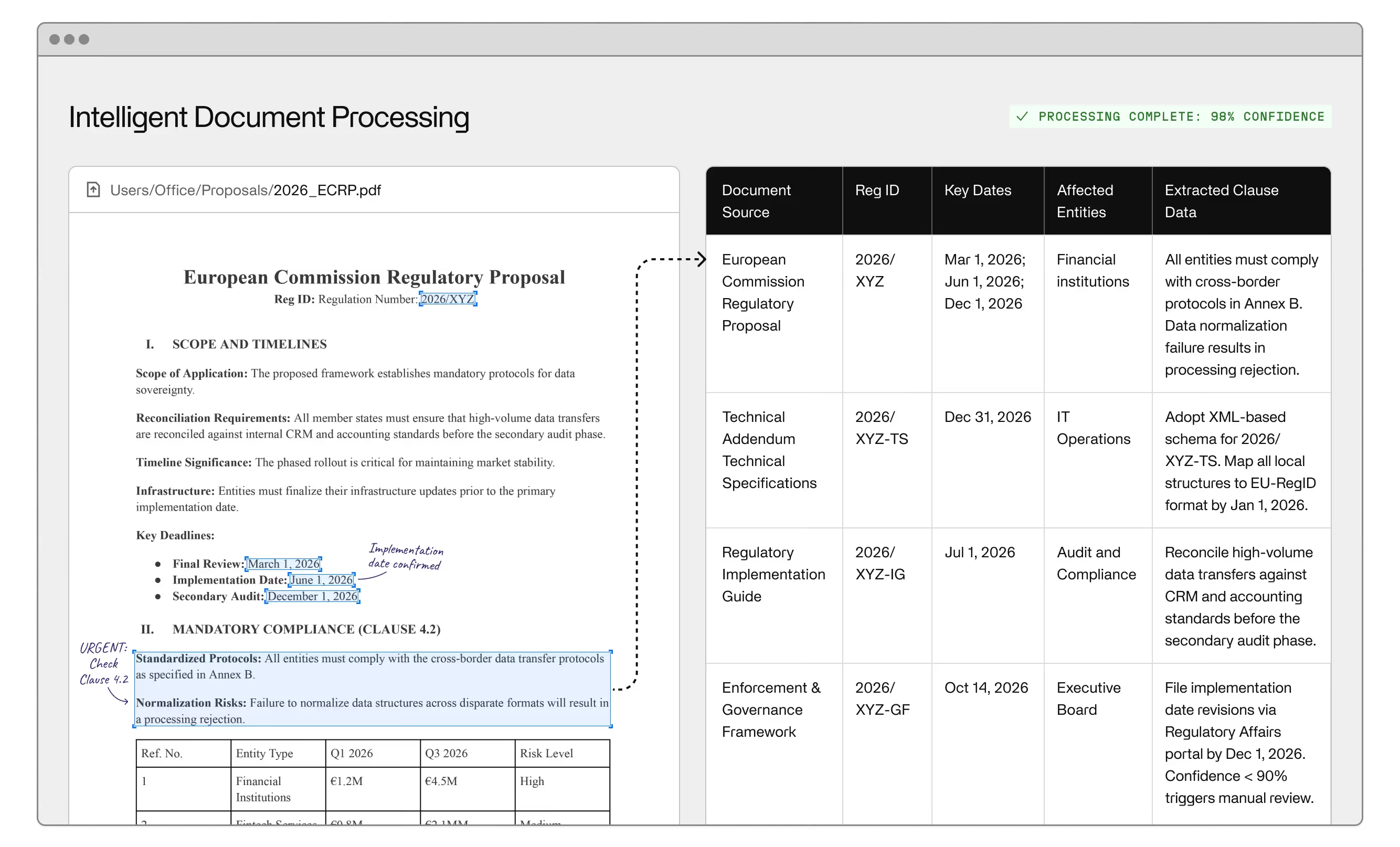
Your automation is working exactly as designed. Until it hits a document it wasn't designed for. The vendor sends a purchase order in a layout no one has encountered before. An invoice arrives with a handwritten annotation in the margin. An insurance claim comes in with a supplementary attachment that doesn't conform to any known template. These aren't failures in the conventional sense. They're exceptions. And most automation tools don’t handle them. They stop.
The back-office exception problem isn't a technical edge case. It's a structural limitation built into most automation approaches, and it surfaces at exactly the worst moment: when volume is high, SLAs are tight, and the fallback is a manual data entry queue that grows faster than your team can clear it. Understanding where the limitation originates, and what intelligent document processing actually does differently, is the decision that separates enterprise back-office automation that scales from automation that creates new operational debt.
Rule-based automation operates on a closed-world assumption: every input matches a known pattern, every field sits in the expected location, every document arrives in the expected format. In controlled environments with structured data and locked-down vendor relationships, that assumption can hold. In real enterprise back-office operations, it's wrong from the start.
The back-office workflows that benefit most from automation are also the ones with the most document variability. Back-office environments process documents from dozens of suppliers, customers, and partners operating on their own standards. Purchase orders arrive in hundreds of layouts. Invoice processing spans PDFs, scanned images, and spreadsheets that share no structural logic. Insurance claims combine typed fields with handwritten notes. Patient records include information distributed across multiple document formats within the same submission. Resumes have no fixed schema whatsoever. The exception, in practice, is the norm.
Most automation tools, including the majority of OCR and RPA implementations, are designed for the happy path. When a document deviates from the expected template, the system either produces incorrect output or halts processing entirely. Both outcomes require human intervention. Neither outcome was designed into the workflow in any useful way.
A document exception is any input the system cannot process with sufficient confidence to produce a reliable output. There are a few categories driving the bulk of exception volume in practice.
Format variation is the most common. A supplier updates their invoice template. A new vendor sends purchase orders in a layout the system has never processed. The fields are present; the automation just can't locate them. Layout-dependent OCR breaks immediately. Structured data extraction fails before it begins. There's no rule in the system that covers the new format, and creating one requires time, access, and technical resources that most operations teams don't have on demand.
Unstructured documents present a harder problem. Contracts, resumes, certain insurance claims, and legal correspondence don't follow conventional field-and-position structure. There's no fixed column to extract from. The information exists in the text, but extracting it accurately requires understanding context, not matching patterns against a template.
Image quality and handwriting introduce another failure mode. Even when the document type is known and the layout is consistent, poor scan resolution or handwritten annotations push past what optical character recognition alone can reliably handle. Intelligent character recognition (ICR) extends these capabilities, but without machine learning behind it, ICR still fails on high variability inputs. It reads more characters more accurately. It still doesn't understand what the characters mean.
Missing or ambiguous data creates a category of decision-point exceptions that no amount of extraction accuracy can resolve. An invoice with a blank line item description. A purchase order referencing an unrecognized cost center. Patient records with conflicting admission dates. These require judgment. The system can't supply it. So it waits.
OCR and RPA fail on exceptions because neither was built to handle document variation, not document conformity.
Optical character recognition has been the operational baseline for document processing for decades, and it remains effective on structured, high-quality inputs. OCR is a reading technology. It converts image pixels to character strings. It has no model of what those characters mean, where relevant fields are located, or whether the extraction is correct. The moment a document stops conforming to expectations, OCR delivers either wrong output or no output.
Robotic process automation extended this by adding workflow automation around OCR output, routing extracted data to downstream systems like ERP and CRM. For structured workflows on predictable inputs, RPA created genuine efficiency gains. The problem is that RPA is built on brittle rules. Change the input format and the rules break. Every exception that fails to match a recognized pattern either throws an error or escalates to manual review. At scale, this generates exception queues that require dedicated headcount to resolve: exactly the operational cost that business process automation was supposed to eliminate. The pattern that causes back-office automation projects to fail at scale almost always traces back to this brittleness in the rule layer.
Confidence scores define the boundary of the problem but don't solve it. When a system's confidence in its extraction falls below a set threshold, the document gets flagged for human review rather than processed with incorrect invoice data downstream. Confidence scoring tells you the system doesn't trust its own output. It doesn't route the flagged document intelligently, prioritize it by business impact, or surface the specific reason for the flag. The reviewer gets a queue and starts from scratch.
Manual data entry becomes the permanent backstop, not the temporary fallback. And as volume grows, the exception queue grows proportionally. The scalability problem that intelligent document processing was supposed to solve resurfaces as a manual processing bottleneck with a different name.
Intelligent document processing is the document automation category that combines OCR, machine learning, natural language processing, computer vision, and deep learning into a unified document understanding system. The distinction from earlier approaches is precise: IDP models understand documents. They don't just read them.
IDP handles unstructured data by design. Where RPA requires a rule for every format variant, an intelligent document processing system builds a model of what a document type looks like across the full range of variation it's encountered. Artificial intelligence, specifically the machine learning and NLP layers within an IDP system, makes it possible to extract the right data from a document even when that exact document format has never appeared in training data before.
Intelligent document classification is the step most rule-based systems skip entirely. An IDP system identifies what kind of document it's processing before it attempts extraction, distinguishing between an invoice, a purchase order, an insurance claim, and a resume before deciding how to handle it. Each document type requires different data extraction logic, different data validation rules, and different downstream routing. Without intelligent document classification, the system is applying invoice extraction rules to every document that crosses the threshold, including the contract that happens to contain a dollar amount.
Data extraction in an IDP system operates on semantic understanding, not positional matching. NLP models trained on business document content locate relevant fields across format variations without requiring the field to appear at a fixed set of pixel coordinates. LLMs extend this further — large language models can reason about ambiguous text, infer missing information from context, and process unstructured documents that have no fixed extraction template whatsoever. Generative AI capabilities are increasingly embedded in intelligent document processing platforms to handle open-ended document content that structured extraction logic can't address. A second LLM pass can function as a validation layer, catching extraction errors that a first-pass model assigned high confidence to incorrectly.
Computer vision adds layout understanding on top of text recognition. An IDP system recognizes that a table is a table even when visible borders are absent, that a signature block is structurally distinct from the body text above it, and that handwritten metadata in the margin is separate from the typed content it annotates. Pre-processing pipelines normalize inputs before extraction begins: correcting orientation, improving resolution, and isolating relevant document regions so the extraction model operates on clean data.
AI agents handle document ingestion across email, APIs, and file transfer without manual intake. A second generation of AI agents is now embedded in IDP platforms to handle document routing decisions in real time: flagging invoice data anomalies, escalating insurance claims that exceed confidence thresholds, and passing clean outputs directly to ERP without human review. Document management workflows route processed outputs to the right downstream system automatically, based on document type, extracted content, and confidence levels. This is intelligent document processing software operating as a full workflow layer, not just an extraction component.
Intelligent document processing does not eliminate human review. Every serious IDP implementation includes human-in-the-loop capability; the difference is how exceptions reach reviewers and what happens with their input.
In a well-designed IDP system, human review is a designed feature of the workflow, not a failure of the automation. When model confidence falls below threshold, or when the document type requires a judgment call the model can't make reliably, the IDP system routes the exception to a reviewer with full context: what was extracted, where the uncertainty sits, what the document contains, and what specific decision is needed. The reviewer makes a targeted call — not a full reprocessing job from an undifferentiated queue.
What distinguishes intelligent document processing software with active learning from prior generations of automated document processing is that every reviewed exception becomes training data. The categories generating the most human review today should generate significantly less review 60 to 90 days from now, as the model incorporates corrections and builds on the judgment calls your team has already made. IDP exception rates decline as the system learns. RPA exception queues grow with volume regardless of what the team does. The scalability advantage of intelligent document processing isn't raw throughput. It's the decreasing cost of exceptions over time.
Unhandled exceptions don't stay in the document processing layer. Every incorrectly processed or unprocessed document creates data quality problems that cascade through every system downstream that depends on that data.
Accounts payable is the clearest example. An unresolved invoice exception holds payment. Supplier relationships strain. Late-payment penalties accrue. When resolution happens through manual data entry, keying errors enter ERP systems directly, affecting financial reporting, budget reconciliation, and audit accuracy. Invoice data that should have flowed automatically through the back office now requires remediation work that touches finance, operations, and IT.
CRM data gaps trace back to the same root failure. When automated document processing fails on a new customer record, the data that should populate the account either doesn't arrive or arrives wrong. Customer-facing teams operate from incomplete records. Billing, compliance, and downstream personalization run on inaccurate inputs. Because back-office systems connect to downstream systems through APIs, errors don't stay contained; they propagate across every API-connected system in the chain before anyone identifies the source document as the origin.
Human resources operations face the exception problem with resumes and employment documentation that arrives in every conceivable format. Insurance carriers face it with claims — Invisible achieved 8x faster claims processing for Headway by replacing brittle extraction with an IDP system built to handle that variability. Healthcare systems face it with patient records across providers and formats. The document types differ. The underlying problem is identical: an automation layer that handles the predictable and abandons everything else.
Digital transformation at the back-office layer is not about deploying automation and stepping away. It's about building a document processing system that gets better at the hard cases instead of accumulating them in a queue that grows without bound. Intelligent document processing is the architecture that makes that possible: not by eliminating exceptions, but by handling the categories that matter, routing the remainder to reviewers with the context they need, and improving continuously as reviewed exceptions become training data.
If your back-office operations are hitting the exception wall: queues growing, data quality degrading, manual headcount expanding to absorb what automation should have handled. Invisible's intelligent document processing solutions address exactly this problem. Get started.
Intelligent document processing (IDP) is a document automation category that combines OCR, machine learning, NLP, and computer vision to extract and classify data from both structured and unstructured documents. Unlike OCR alone, which converts images to text without understanding meaning or context, IDP systems identify document types, locate relevant fields regardless of format variation, and improve accuracy over time through machine learning.
IDP delivers the strongest results on high-volume, high-variability document types: invoices, purchase orders, insurance claims, patient records, contracts, and resumes. These are documents where format variation is high, manual data entry costs are significant, and processing errors have downstream consequences in ERP, CRM, and accounts payable systems. The greater the input variability, the larger the advantage IDP holds over rule-based alternatives.
When extraction confidence falls below a defined threshold, IDP systems route the document to human review with full context: what was extracted, where the uncertainty sits, and what decision is needed. Reviewed exceptions feed back into the model as training data, reducing the exception rate over time. This is the structural difference from RPA exception queues, where volume accumulates without improving system performance.
Human-in-the-loop review is a designed feature of effective IDP implementations, not a sign of system limitations. No automated system processes all document variations correctly at launch. HITL ensures exceptions are resolved accurately while generating the training data that improves model performance. Over time, the proportion of documents requiring human review decreases as the IDP system learns from the decisions your team has already made.
Most enterprise IDP deployments see measurable improvement in exception rates within 60 to 90 days of active use, as reviewed exceptions generate enough training data to update model behavior at scale. High-volume workflows with consistent exception categories improve faster than low-volume or highly variable document types, where the training signal takes longer to accumulate.
ERP systems, CRM platforms, and accounts payable workflows are the primary systems affected. Unresolved or incorrectly processed exceptions create data gaps and keying errors that propagate through API-connected systems before the source problem is identified. For accounts payable specifically, unresolved invoice exceptions directly impact payment timing, supplier relationships, and financial reporting accuracy.