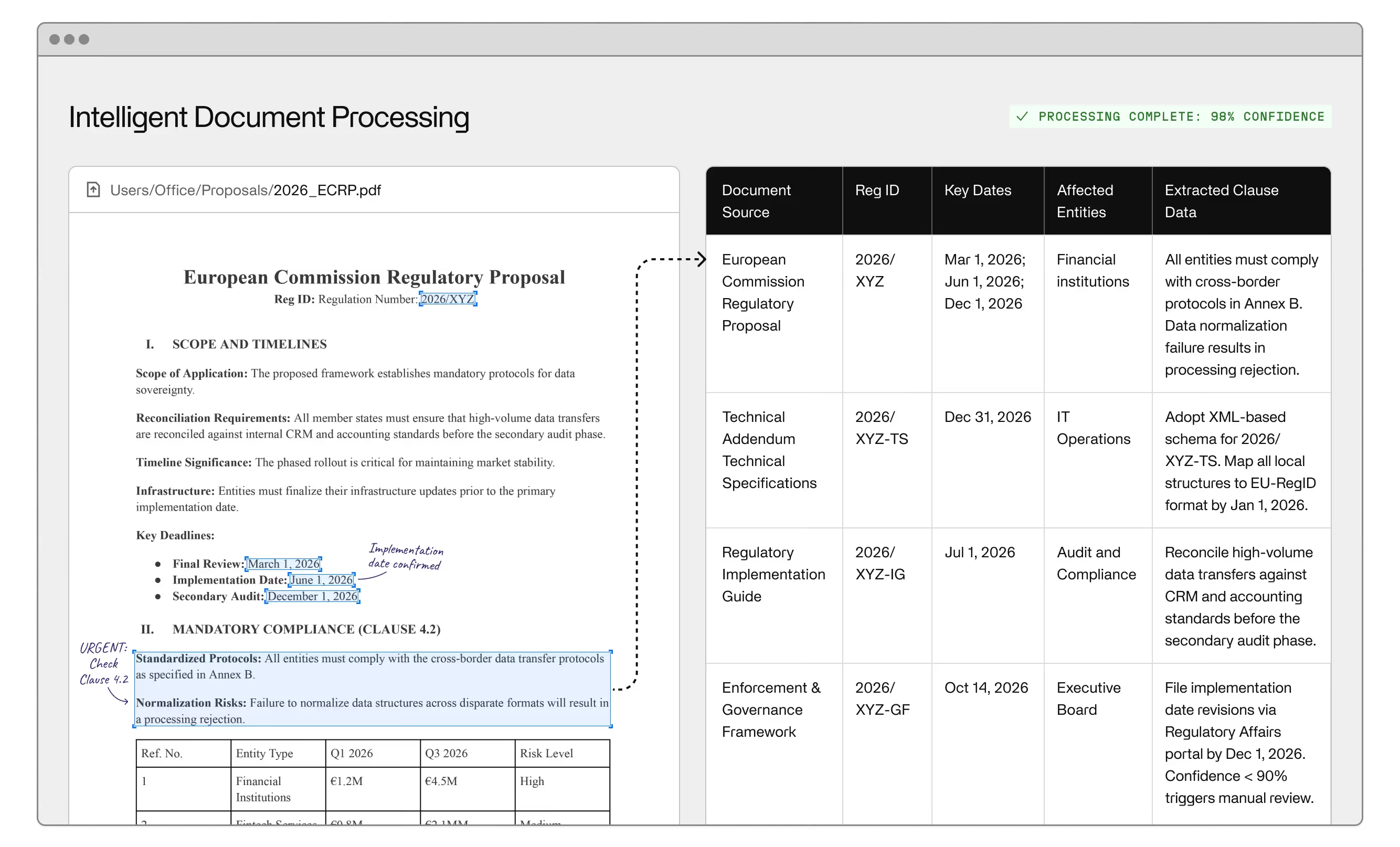
Document process automation is back-office automation applied specifically to documents — the capture, extraction, classification, and routing of information from PDFs, scanned forms, invoices, contracts, and every other format that arrives without the structured data your systems need to act on it. If a human is currently reading a document and re-entering its contents somewhere else, that is a document automation problem.
For enterprise operations teams, this matters because document workflows are where back-office inefficiency concentrates. Not because the work is complicated, but because the volume is high, formats vary, and the cost at scale is significant. Document processing automation removes that cost, improves accuracy, and frees the people doing it for work that requires judgment rather than transcription.
This guide covers how the technology works, where it fits alongside robotic process automation and intelligent document processing, and what enterprise teams should understand before evaluating solutions.
Document automation handles the portion of back-office operations where data arrives in formats that standard systems cannot process directly. That includes PDF invoices, scanned documents, paper forms that were digitized, email attachments, and any other input where a person was previously required to interpret content and enter it before the workflow could continue.
In practice, the technology performs four core functions. It captures document content from whatever channel it arrives in. It runs the extraction step to extract data from that content, pulling the relevant fields and discarding surrounding noise. It classifies the document by type and routes it accordingly. And it triggers the next step in the workflow: updating a system of record, flagging an exception for review, or moving the document to the next processing stage.
What separates modern document automation from older rule-based approaches is handling variation. An invoice from one supplier won't look identical to one from another. A contract amendment won't follow the same structure as the original. Systems trained on real document examples adapt to variable input rather than breaking when a document deviates from a fixed format — and that adaptability is what makes document automation useful at real enterprise volumes, not just controlled pilots.
Document automation isn't a single technology — it's a stack, and understanding each layer helps operations leaders evaluate whether a given solution will handle their actual document types.
Optical character recognition is the extraction layer. OCR reads text from images, scanned inputs, and PDFs that lack an embedded text layer. The practical quality metric isn't benchmark accuracy on clean samples. It's OCR performance on faded documents, inconsistent fonts, and mixed formats — which is what enterprise documents actually look like in production.
Machine learning classifies what the extraction layer produces. It learns to identify document types, locate the fields that matter within each type, and separate relevant content from surrounding noise. Classification accuracy improves over time with human feedback as the system processes more examples from your specific document mix.
Natural language processing handles the semantic layer: understanding what text means, not just what characters are present. For documents where relevant information is embedded in free-form language — a clinical note, a legal clause, a complaint narrative — NLP extracts structured data from unstructured data that optical character recognition alone cannot parse.
Intelligent document processing, or IDP, is the term for systems that combine these layers into an integrated pipeline. IDP handles ingestion, classification, extraction, validation, and routing as a single automated workflow rather than requiring separate tools for each stage. For teams processing high volumes of variable-format documents, IDP is the practical architecture — not individual OCR or artificial intelligence tools stitched together manually.
RPA — robotic process automation — handles rule-based tasks across systems where inputs are already structured and predictable. It works well when data is already in the right format and the process never varies. It breaks when documents arrive inconsistently, fields appear in different positions, or exceptions arise that the rule set wasn't written to handle.
Document automation handles the step that precedes RPA: extracting structured data from unstructured documents so it can flow into any downstream system or process. When a document arrives, the extraction pipeline validates the content and passes structured output to whatever platform needs it — a case management system or downstream platform. The two technologies serve different parts of the same pipeline rather than competing for the same problem.
The practical issue is that operations teams sometimes buy RPA platforms expecting results the technology wasn't designed to produce. Manual document processing doesn't become automated by adding it to the front of the pipeline. It becomes automated when the extraction layer processes unstructured input first, so that downstream systems receive clean, structured data rather than variable-format documents they can't process.
IDP is the more capable version of document automation, and the distinction matters at enterprise scale.
Basic document automation tools operate on templates and fixed rules. They handle documents well when formats are consistent — the same invoice layout from the same supplier, the same form from the same source each time. They fail on variation. An IDP system trained on machine learning doesn't need documents to match a template. It learns from examples and generalizes, handling new document types, unexpected layouts, and formats that template-based systems reject or require manual reconfiguration to accommodate.
The second difference is how exceptions are handled. IDP systems score the confidence of each extraction, route low-confidence results to a human review queue with full context, and feed corrections back into the model. That loop — automated extraction, confidence-based escalation, human correction, model improvement — is what makes IDP production-grade. Without it, errors accumulate quietly instead of being surfaced for remediation.
Generative AI is extending what IDP can do. Where earlier intelligent document automation systems extracted named fields from known document positions, generative AI interprets free-form content — drafting summaries, identifying relevant clauses, answering questions about document data without structured extraction. For operations teams dealing with contracts, clinical notes, or regulatory filings, this represents a meaningful step beyond what traditional document process automation could deliver.
The use cases cluster wherever documents arrive in high volume, in variable formats, and with significant consequences for errors.
Healthcare is the most document-intensive enterprise environment. Patient intake forms, insurance claims, prior authorization requests, clinical notes — every step in the revenue cycle and care coordination process depends on information locked in documents, making the administrative burden in healthcare one of the most acute operational problems AI is being applied to. IDP in healthcare automates data extraction from scanned forms, routes claims through approval workflows, flags discrepancies before they generate denials, and writes results directly to billing and EHR systems. The combination of volume, unstructured data, and regulatory compliance requirements is why healthcare has become one of the primary deployment environments for enterprise-grade document automation.
Finance and banking use the technology for invoice processing, credit package assembly, and reconciliation workflows. Bills of lading — high-volume, variable-format, processed under time pressure across logistics and trade finance — are exactly the document type where automated document processing outperforms manual entry by a substantial margin. The pipeline extracts the relevant data fields and routes them to downstream systems without requiring a person at each step.
Legal documents represent a high-value use case at most enterprises: contract review, clause extraction, compliance verification, and due diligence pipelines that once required hours of review time now run as automated workflows with human escalation reserved for ambiguous cases.
Human resources operations — employment paperwork, benefits documentation, compliance records — are document-heavy and highly repetitive. Document management and routing happen automatically while judgment-dependent decisions stay in human hands.
AI agents are extending the capability further, acting on document data rather than just extracting it — filing, responding, and updating systems based on document content without human intervention at each transaction.
Document automation is a specialized application of business process automation, and the gap between an off-the-shelf document automation software product that deploys in a day and a production-grade IDP system is real, and it surfaces quickly once actual document volumes hit the pipeline.
Off-the-shelf document automation software handles clean, consistent documents well. Performance degrades on the inputs enterprise operations teams actually receive: scanned documents from multiple equipment generations, invoices from hundreds of suppliers, forms that don't match any configured template. Each exception that falls outside the system's training generates errors requiring manual remediation — the exact outcome the technology was supposed to eliminate.
Scalability is a genuine operational distinction. A system that processes 500 documents per day in a pilot may require significant rearchitecting to handle 50,000 per day in production. Enterprise deployments are designed for production volume from the start, not retrofitted after a pilot proves the concept.
Integration depth matters equally. Document processing automation that can't write extracted data to your existing systems, or trigger downstream workflows in existing platforms, replaces one manual step with another. Production-grade systems integrate into existing stacks rather than requiring teams to work around them.
Document management expectations differ at enterprise scale. Audit trails, version control, retention policies, and regulatory compliance requirements are table stakes for enterprise deployments — not configuration items for a later phase.
The deeper operational distinction is exception handling. Every IDP system encounters inputs it can't process at high confidence. The difference between systems is what happens next: do exceptions disappear into a backlog where errors accumulate, or does a confidence layer surface them for targeted human review — document and flagged field in context, correction fed back into the model? The latter produces a self-improving system. The former is what makes digital transformation projects stall after initial deployment, when exception rates in production turn out to be higher than the pilot suggested. For teams still weighing automation against back-office outsourcing alternatives, the cost and control tradeoffs look different once document automation is factored in.
Invisible builds production-grade document automation for enterprise operations teams. Get in touch to explore how we'd approach your document workflows.
Document automation is the use of artificial intelligence and OCR to capture, extract, classify, and route document content without manual data entry at each step. Instead of requiring a person to read each document and enter its contents into a downstream system, the technology handles extraction and routing automatically — with human review reserved for low-confidence results and genuine exception cases.
RPA handles structured, rule-based tasks across systems where inputs are already predictable. The technology handles the prior step: turning variable-format document content into structured data so it can flow into any downstream process. This is why many back-office automation projects underdeliver — the unstructured document problem was never addressed before automation was added downstream.
IDP is document automation that combines these extraction and classification layers into an integrated pipeline, adding confidence scoring and human escalation on top. Unlike template-based tools, IDP handles variation in document format and content, scores each extraction for confidence, and escalates low-confidence results for human review. IDP is the architecture for enterprise teams whose document volume, variety, and error tolerance requirements exceed what basic document automation software can handle.
Production-grade IDP systems assign a confidence score to each extraction and route results below the threshold to a human review queue. The reviewer sees the original document alongside the flagged field, corrects the extraction, and that correction is fed back into the model. This loop improves accuracy over time rather than accumulating errors silently — the core operational difference between enterprise IDP and off-the-shelf tools.
These systems handle invoices, insurance claims, contracts, patient forms, bills of lading, regulatory filings, legal documents, HR paperwork, and most inputs that arrive as PDFs, scanned files, or email attachments. Modern IDP handles format variation without requiring a separate template for each document source or supplier.
Yes — and integration depth is one of the primary differentiators at enterprise scale. Production-grade IDP writes extracted data directly to your ERP, your CRM, and other downstream systems as part of the automated workflow, without requiring manual intervention to move data between platforms. Tools that stop at extraction and leave the integration step to your team have replaced one manual process with another.