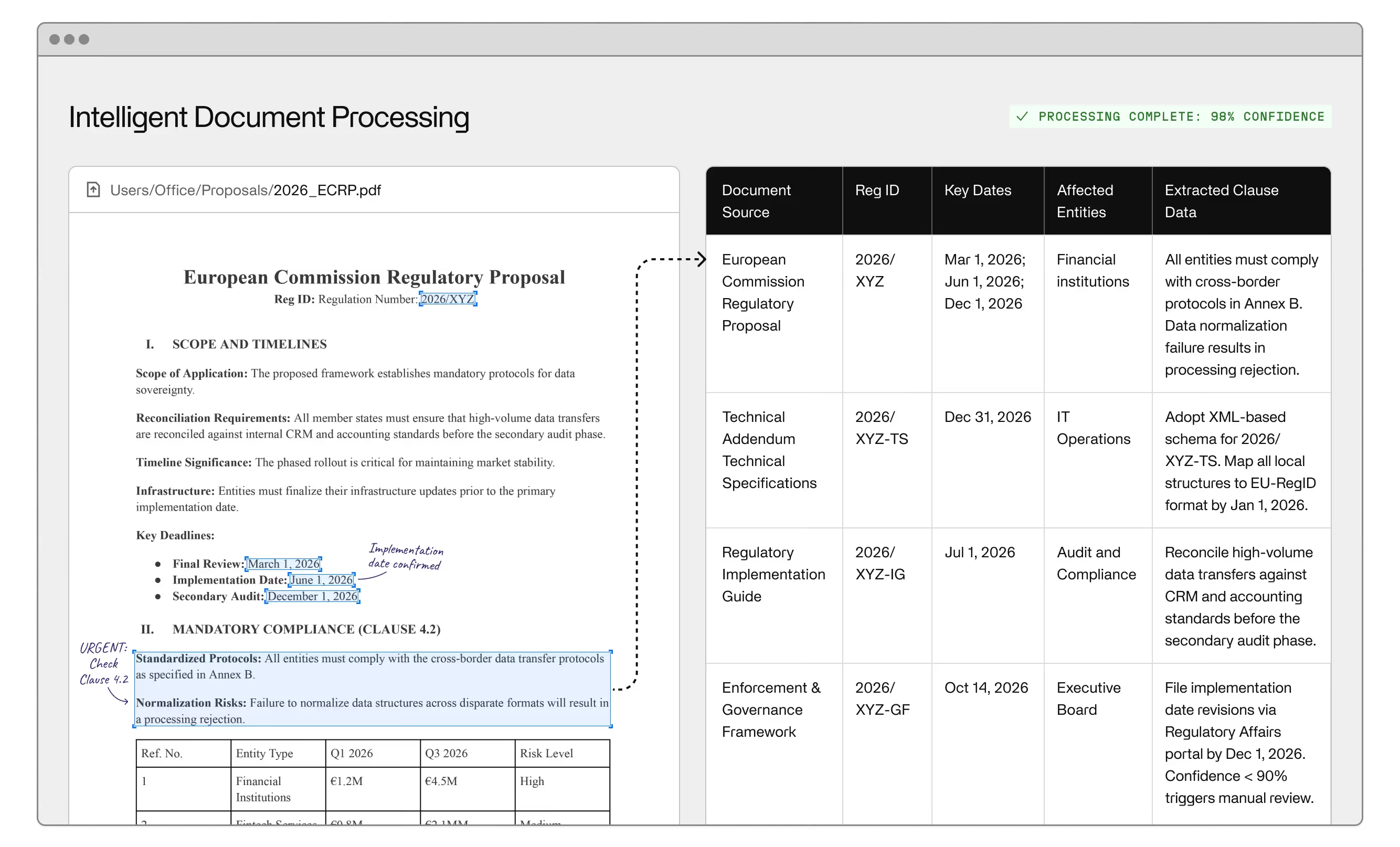
Back-office automation delivers strong returns in specific workflows and marginal ones in others. Not every process is equally automatable, and teams that start in the wrong place build momentum in the wrong direction. The workflows where back-office automation consistently produces results share a common profile: high transaction volume, inputs that follow a predictable pattern even when they arrive in inconsistent formats, and decision logic that can be specified clearly enough for a system to execute it. Where all three conditions are present, the case is clear. Where they're not, you're solving a process design problem first.
If you're still working through the definition of what back-office automation is and where it typically operates, the plain-language guide establishes that baseline — this post assumes the definition is settled and focuses on workflow prioritization.
Volume, structured inputs, and specifiable decision logic are the three conditions worth evaluating before committing to any workflow. Volume determines whether the fixed investment in implementation is justified. Inputs determine whether the system has enough to work with. Decision logic determines whether the automation can produce a correct output or only a guess.
Workflows that pass all three checks are your highest-confidence targets. Workflows that pass two out of three typically work but require more human oversight in the early phase, as the system learns to handle edge cases that weren't fully mapped upfront. Workflows that pass only one usually belong on a different roadmap.
Finance is where back-office automation produces its most defensible returns. Accounts payable runs at high volume, involves structured inputs from a finite set of vendors, and operates on well-defined decision rules: match the invoice against the purchase order, confirm receipt, route for approval, pay. The problem is that real AP workflows are built around exceptions — mismatched vendor IDs, invoices that arrive as scanned PDFs in irregular formats, missing line items, approval chains that stall in email rather than a system your team actually manages. Manual data entry and human routing through those exceptions is slow, expensive, and error-prone in ways that compound downstream.
Invoice processing automation extracts fields from unstructured documents, runs three-way matching, flags exceptions with the relevant context surfaced, and routes to the right approver without a human in the middle. Teams operating in document-heavy finance environments — where most inputs arrive as PDFs, faxes, or email attachments — will find that enterprise document automation maps this layer of the problem in more specific terms. Accounts receivable follows the same pattern. Both improve cash flow visibility: when the data moving through your finance stack is clean and current, financial reporting is faster and more accurate. Every reconciliation and audit trail becomes a byproduct of the system operating normally rather than something your team has to produce manually.
The sticking point in most finance automations isn't the technology. It's that AP teams have spent years building exceptions into their manual processes and never documented them. Before deploying any back-office automation software in finance, map what actually happens when an invoice doesn't match — not what's supposed to happen.
Procurement workflows are high-volume, rule-heavy, and chronically delayed by manual handoffs that add no value. Purchase orders that require someone to key data from a vendor portal into your systems, approval chains that stall in inboxes, order processing queues that back up when a team member is out — back-office automation removes each of these failure modes, and the combined effect on cycle time is significant.
ERP integration is the core architecture constraint. Automation that can't read from and write to your ERP hasn't solved the problem; it's created a parallel system that still requires manual reconciliation. Teams that get this right treat integration as the first design decision, not a later phase.
Procurement automation also creates the documented approval workflows and exception logging that compliance and governance teams require. That's a secondary benefit until the audit arrives.
If the question isn't which workflows to automate but whether to automate or outsource the back-office function entirely, back-office outsourcing versus AI automation maps that comparison specifically for operations teams.
Human resources has one of the highest concentrations of automatable workflows in any back-office environment. Employee onboarding is the clearest example. Document collection, verification, system access provisioning, benefit enrollment triggers, and communications all follow predictable sequences that vary by employee type but not arbitrarily. An automated workflow handles each step, routes exceptions to HR staff with the relevant context ready, and maintains a full record of every action and timestamp.
Beyond onboarding, HR operations run on data management across disconnected systems — HRIS, payroll platforms, performance management, compliance tracking. The manual data entry required to keep these systems in sync is a daily source of error that most HR teams have learned to expect rather than fix. Automation that keeps records current across platforms removes that error class entirely and frees HR staff for the work that requires judgment. The result is increased productivity from the same team — not from effort, but from elimination.
Enterprises running on legacy systems face a specific version of the data management problem. The systems aren't going anywhere, but the data they hold needs to flow into modern platforms to be useful. The standard solution is to manually key records as a bridge: a team member exports from one system and types it into another. That bridge is expensive, slow, and impossible to scale.
Back-office automation reads from those outputs and writes into downstream platforms — CRMs, ERPs, analytics layers — without the human in the middle. AI agents handle the format variations and field-mapping inconsistencies that rigid rule-based scripts fail on. Machine learning models trained on historical correction data improve as the system accumulates experience, reducing the exception rate over time.
The CRM tends to be an indirect beneficiary. Customer records that depend on manual updates from order processing, billing, or service teams are perpetually incomplete. Automated sync keeps them current without adding headcount.
IT service desk operations are often overlooked in automation planning, but the workflow profile fits well. A substantial share of service desk tickets follow repeatable resolution patterns: password resets, access requests, software provisioning, hardware requests. Routing, status updates, and resolution for standard categories can be automated entirely. Human staff handle what requires actual judgment, which is a smaller portion of the queue than most IT organizations realize before they measure it.
Incident management benefits differently. The value isn't automated resolution — it's consistent triage, escalation, and documentation. An automated system that captures the right information at the right moments, routes to the right team, and generates a reliable record outperforms manual handling every time. The documentation it produces also makes post-incident reviews faster and more useful.
Robotic process automation executes scripted workflows on fully structured, fully predictable inputs. For the narrow category of processes where every input arrives in an identical format and nothing ever deviates from the script, it delivers. That category is smaller than most vendors in the space represent.
When an invoice arrives in an unexpected format, when a vendor ID doesn't match, when a process hits an edge case that wasn't explicitly programmed, RPA stops. Artificial intelligence changes this. AI agents route exceptions to humans with the relevant context surfaced, learn from corrections, and emit confidence scores that tell you which outputs to trust and which to review. That's intelligent automation — not an incremental update to scripted automation, but a different architecture for a different class of problem.
Business process automation describes the execution layer: the system running the steps. Business process management describes the governance layer: defining, monitoring, and improving the processes the automation executes. Enterprise teams doing this at scale need both. Automation without process visibility produces confident outputs you can't interpret. Process visibility without automation produces dashboards for a manual workflow.
The back-office automation software market now spans products built on scripted rules, products built on intelligent automation, and everything in between. They don't behave the same way in production, and the gap shows up most clearly in exception handling.
Three questions separate strong candidates from weak ones. Does the platform integrate with your actual systems, including systems you can't replace on your current timeline? Does it surface the right context to the human in every exception review, or does it simply stop and generate a ticket? Does it improve over time through learning, or does it require manual reconfiguration each time conditions change? Operational efficiency at enterprise scale requires a yes to all three. Digital transformation investments in office automation systems that can't answer that way tend to produce impressive pilots and disappointing production results. Workflow automation that works in a controlled demo and breaks on real data is common.
If your scope extends beyond pure back-office operations, verify that the platform isn't optimized for front office automation at the expense of the back-office use case. Some vendors are clearer about which problem they're actually built to solve than others.
To see how Invisible approaches back-office automation in enterprise environments, get started.
RPA executes scripted, rule-based workflows on fully structured inputs and breaks when data deviates from what it was programmed to handle. AI-based back-office automation handles exceptions by routing low-confidence decisions to humans with relevant context surfaced and learns from corrections over time. For workflows with significant exception rates — which describes most enterprise back-office processes — RPA alone is insufficient.
Accounts payable and invoice processing are the most defensible first investments: high transaction volume, defined inputs, and error costs that are easy to quantify. Data entry workflows bridging disconnected systems to modern platforms are a close second. Both produce measurable results quickly, which matters when building the internal case for broader automation across the back office.
No. Effective back-office automation integrates with your existing systems rather than replacing them. The automation layer reads from and writes to your existing systems while handling the exception logic and data normalization they can't. System replacement is a separate decision with a separate timeline and budget that doesn't need to precede automation.
A focused AP automation typically goes live in six to twelve weeks for a team that maps its exception logic upfront. Teams that skip that mapping phase extend the timeline significantly. Broader deployments covering multiple workflows run longer but can be staged, with individual use cases showing value before full rollout is complete.
The required oversight depends on the exception rate in your specific workflows. Most mature deployments route between five and fifteen percent of transactions to a human review queue — the cases where the system's confidence score falls below threshold or an input deviates enough from known patterns to warrant review. Automation handles the rest, and exception rates typically fall over time as the system learns.
AI agents extract data from scanned PDFs, inconsistent invoice formats, and email-based submissions by learning the field patterns in your specific document set rather than relying on fixed templates. Confidence scores flag ambiguous extractions for human review. As the system encounters and corrects edge cases, it handles a wider range of format variations without human intervention.